Getting started
From signup to tournament entry
Follow the steps from your first account to a confirmed tournament place.
Screenshots show the Swedish BreakPoint forms. The team and payment previews use Stockholmserien 2026 and The Breakers; the confirmation is from the tournament page. Other details are examples. Names, fees and rules vary between events. Select an image to enlarge it. The Swish illustration contains no payable QR code.
1. Create an account and sign in
- Choose Register in the menu.
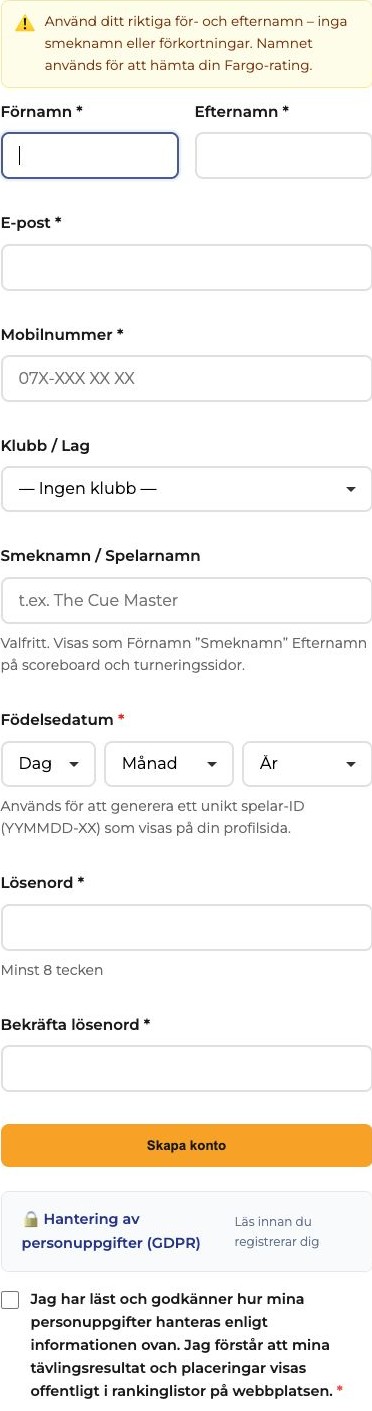
- Enter your real first and last name, email, mobile number and date of birth. Club and nickname have separate fields.
- Choose a password of at least eight characters and enter it again. Read and accept the privacy policy.
- Create your account, then sign in with your email and password.
Already have an account? Use it. Choose Forgot password instead of creating a duplicate account. Check your details under My profile.
2. Find the right tournament
Open Tournaments. Search by name or filter by venue and discipline. Open the event and check its date, venue, entry fee, format, registration window and eligibility requirements.
You can read tournament pages without an account, but must sign in to enter. Following a tournament does not register you. If registration has not opened, check the opening time. If it has closed, contact the tournament director.
3. Enter yourself or a team
- Choose Register on the tournament page.
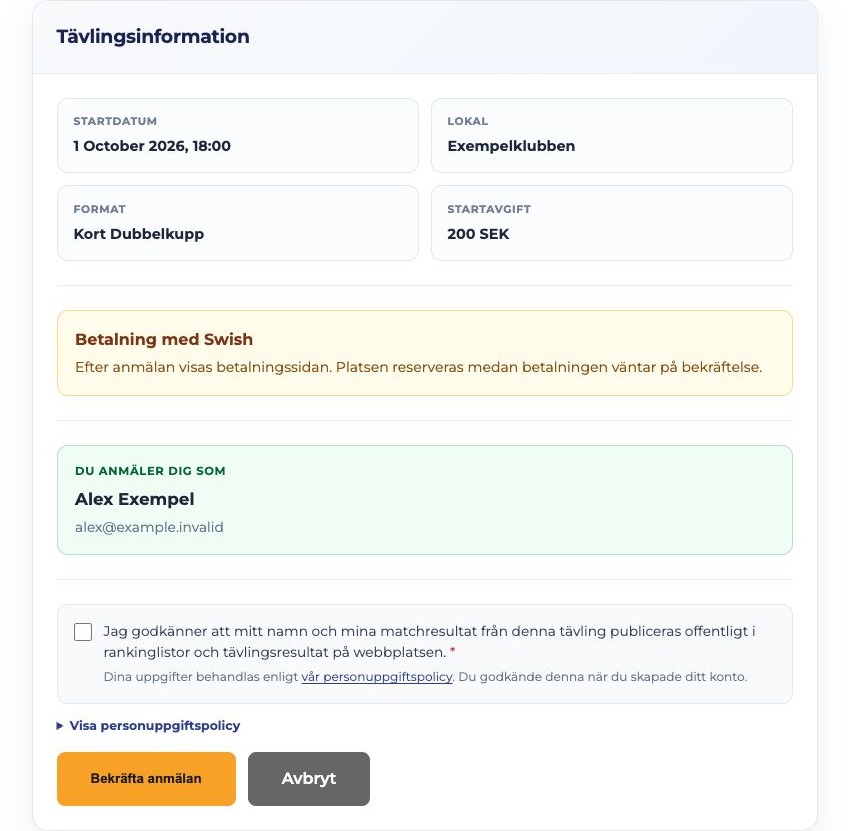
- Check the tournament details and the person or team being entered.
- Read and accept publication of your name and match results for this event.
- Select Confirm registration, then complete the payment step if Swish is required.
Team events
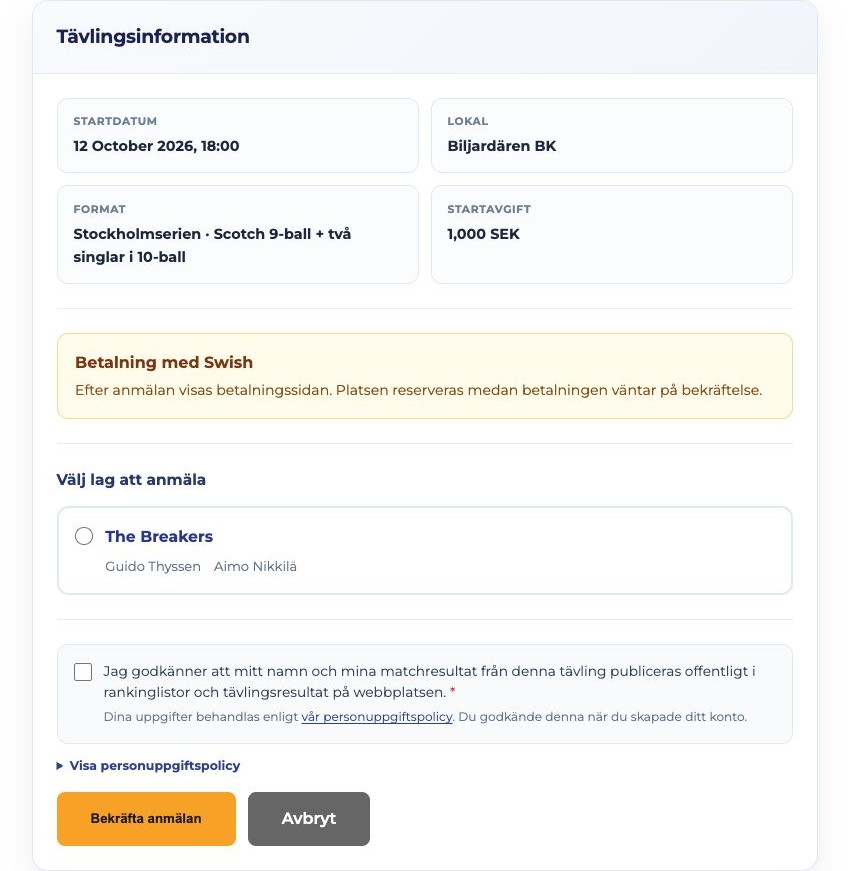
Select the correct team and check its members. If it is missing, first create your team in My profile. Enter the team once, rather than registering each member separately. Event rules determine whether the team and players are eligible.
4. Pay with Swish
For paid Swish entry, a place is reserved while payment awaits confirmation.
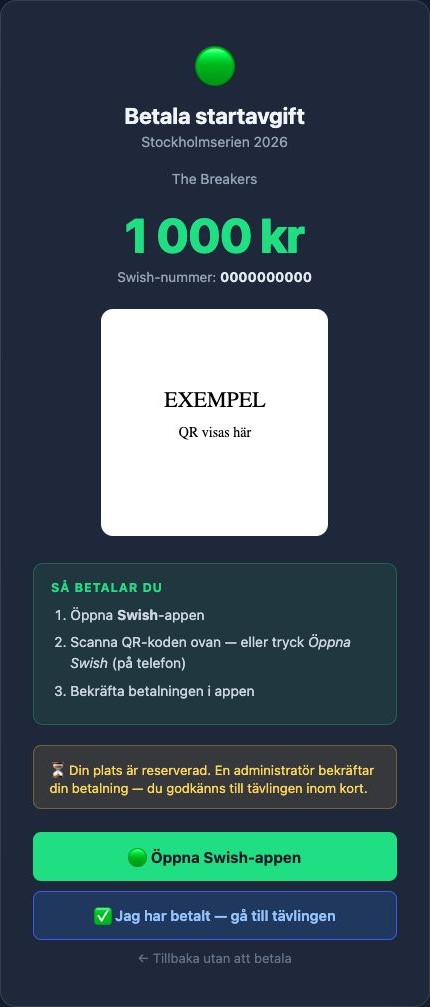
- Check the recipient, amount and message on the payment page.
- On your phone, select Open Swish. On a computer, scan the QR code using Swish on your phone.
- Complete and approve the payment in Swish. Keep the tournament payment message; a team entry includes the team name. Follow any event-specific message instructions.
- Return to BreakPoint and check your entry status.
“Jag har betalt – gå till tävlingen” does not verify payment. It is only a link back to the tournament. With manual Swish, an administrator checks the received payment and confirms the entry. Do not pay again simply because the status has not changed yet.
Some organisers use Swish Handel: successful payment is confirmed automatically when BreakPoint receives the payment response. Follow the payment page shown to you. Cash and free-entry events may use a different flow.
5. Check that your place is confirmed
- Awaiting payment / confirmation
- Your entry exists but is not finally confirmed. If unpaid, follow the payment link on the tournament page. If already paid through manual Swish, wait for the administrator to check it.
- You are registered
- Your entry is confirmed. Check that you or your team appear in the entrant list.
- On the waiting list
- You are queued, without a confirmed tournament place.
For manual Swish, responsible administrators are notified about entries requiring review. This does not mean the money has automatically been verified. If something is wrong, contact the director listed on the tournament page with your name/team, tournament, payment time and amount.

6. Full tournament? Join the waiting list
Individual events can offer a waiting list when full and registration is still open. Confirm your waiting-list entry in the form, then check your queue position on the tournament page.
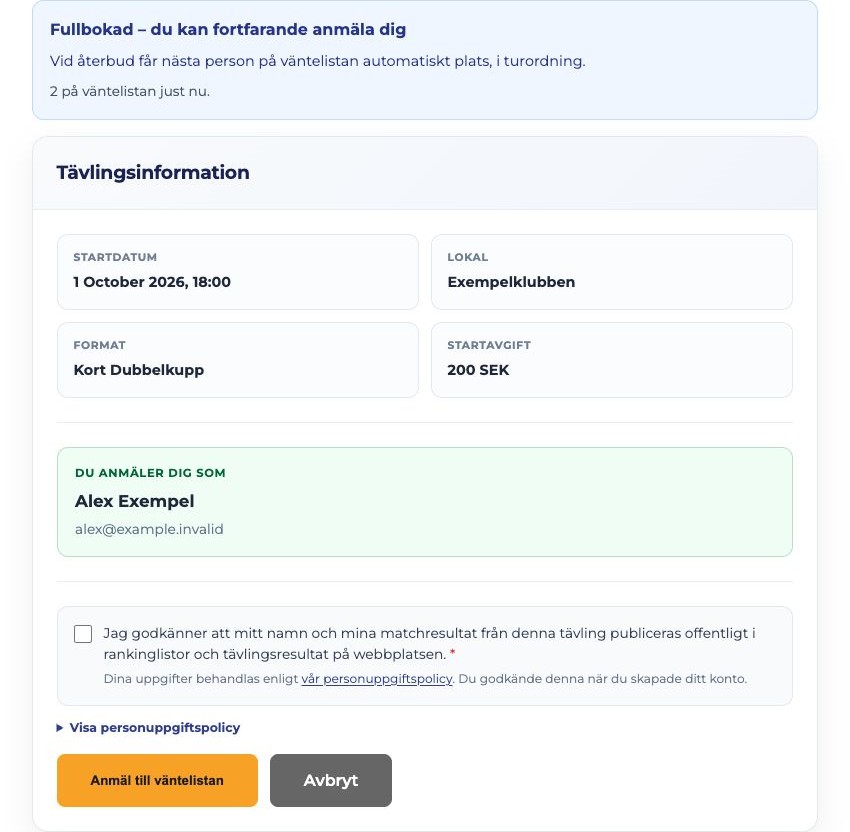
- After a cancellation, the next eligible player can be promoted. Queue order follows when players joined.
- In a paid Swish event, promotion first reserves the place pending payment. Follow the payment link and the confirmation flow above.
- Other payment modes may confirm the entry directly on promotion. Follow the organiser’s payment instructions.
Do not pay merely because you are on the waiting list. Follow the instructions when you receive a place. Enable push notifications if desired, but also check the tournament page: alerts depend on notifications working on your device.
Team events: the standard waiting list is currently unavailable for teams. Contact the director if the field is full.
7. Cancel or get help
If you cannot play, use Cancel registration or Leave waiting list when available on the tournament page. Confirm the action and check your new status. If the control is no longer available, contact the director.
Cancelling does not automatically refund a Swish payment. Discuss refunds with the organiser under the event’s terms.
Related guides: Create a team · Tournament formats · National rating and HCP.